Image

Our demo API calls will result in a person being created within the HRM (Human Resource Management) database.
Before making our 'create person' API call we first need to retrieve the 'person resource template'. A resource template provides the data structure into which the relevant resource information can be inserted.
For this demonstration and ease of use we will be using 'Postman' to make our API calls. Postman is a free API client that makes it easy for developers to create, share, test and document APIs. In your web browser navigate to www.postman.com or search for 'postman API tool' and complete the sign-up process. Postman API calls can be made from the Postman website or by downloading their desktop app.
Once you have completed the sign-up process and are currently signed in to your account navigate to the People First API integration demonstration collection.
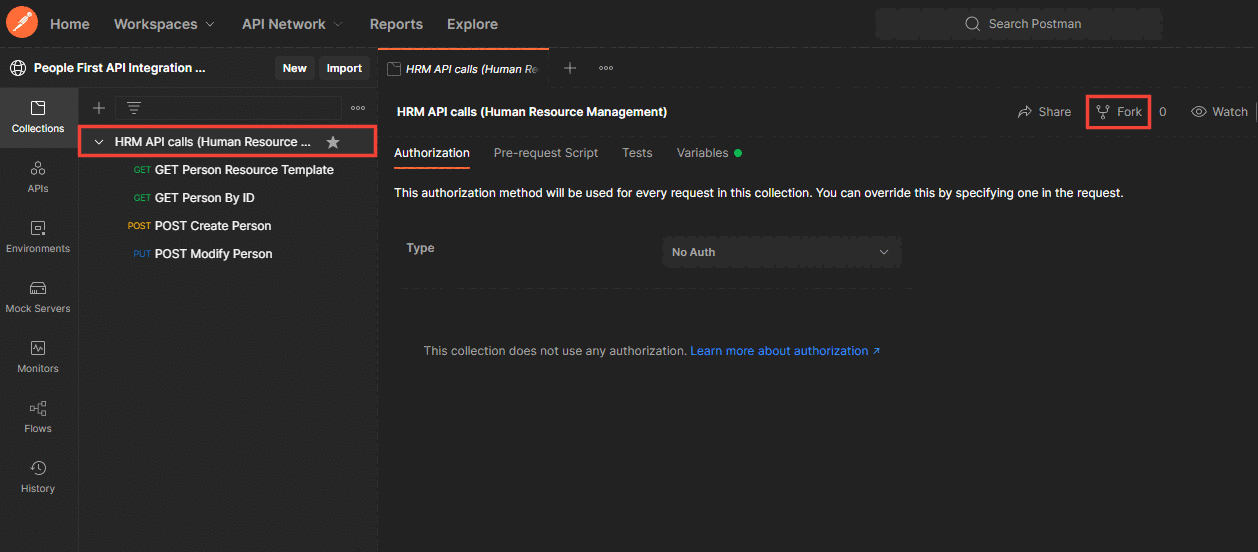
After navigating through to the link the above view should be displayed. Click on the right-hand facing caret symbol next to 'HRM API calls' in the left-hand navigation menu to expand the container and see the four API requests. Click the 'Fork' button to the right above the viewing pane.
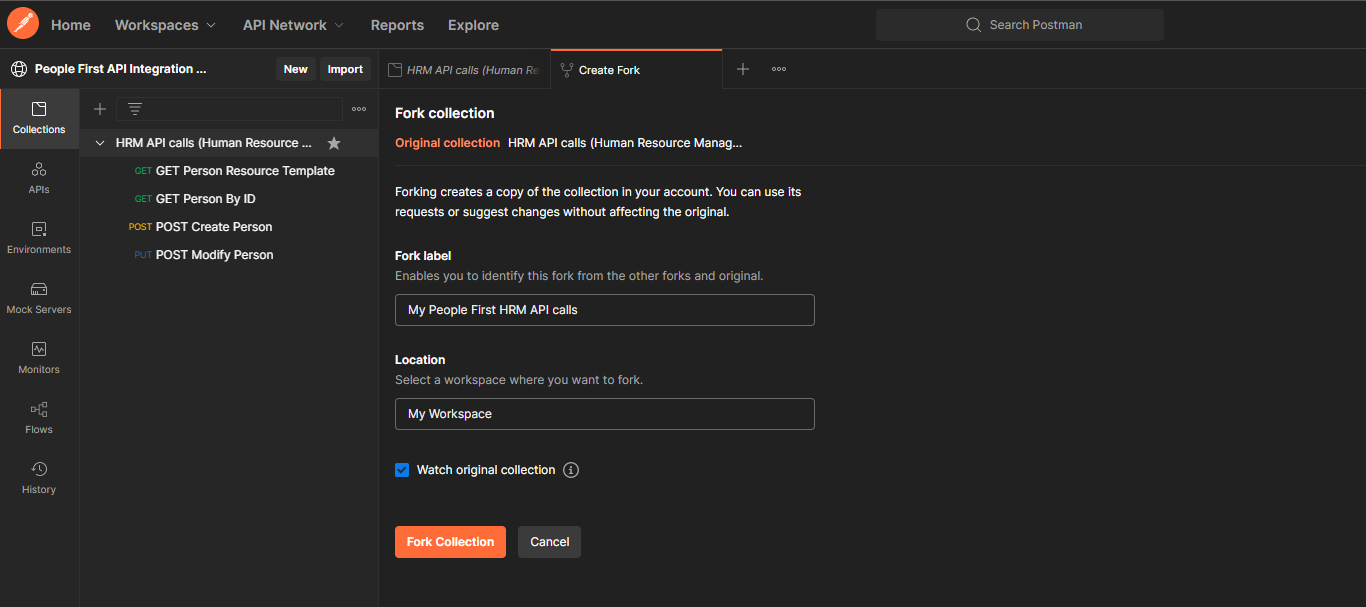
After clicking the 'Fork' button you will arrive at the 'Fork collection' tab as above. Enter a label for your fork, and then select the workspace into which you would like the collection to be forked. The label is just a name to identify this fork from other forks and the original, so just choose a suitable name.
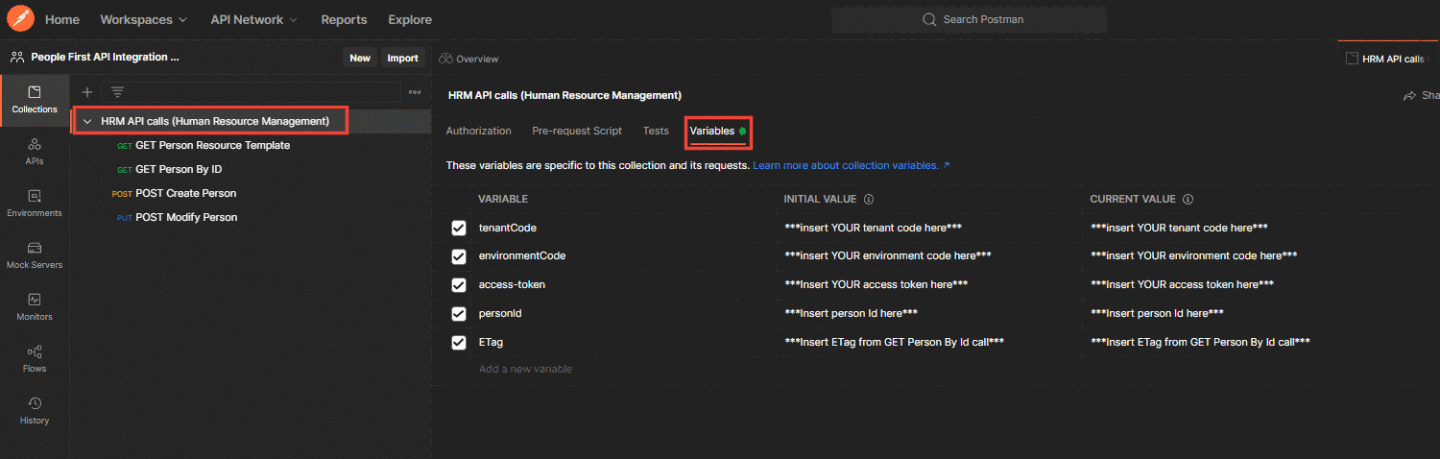
Once you have successfully forked the collection into your personal Postman workspace navigate to your personal workspace and click on the collection itself within the navigation bar labelled 'HRM API calls' and then click on the 'variables' tab above the viewing pane.
The variables for 'tenantCode', 'environmentCode' and 'access-token' can now be populated in the column fields labelled 'initial value' and 'current value'. The tenantCode and environmentCode are provided to you by MHR directly. 'The access-token' can be retrieved by following the guide 'Quick Start Guide - Authentication' which can be found by clicking here.
Do not use the values demonstrated below.

The 'personId' and 'ETag' variables will be filled out after we have made a few calls, but can remain as they are for now.
Once the required variables have been populated navigate to 'Get Person Resource Template' in the left-hand navigation sidebar and then select 'Headers' from the tabs above the viewing pane as highlighted below:
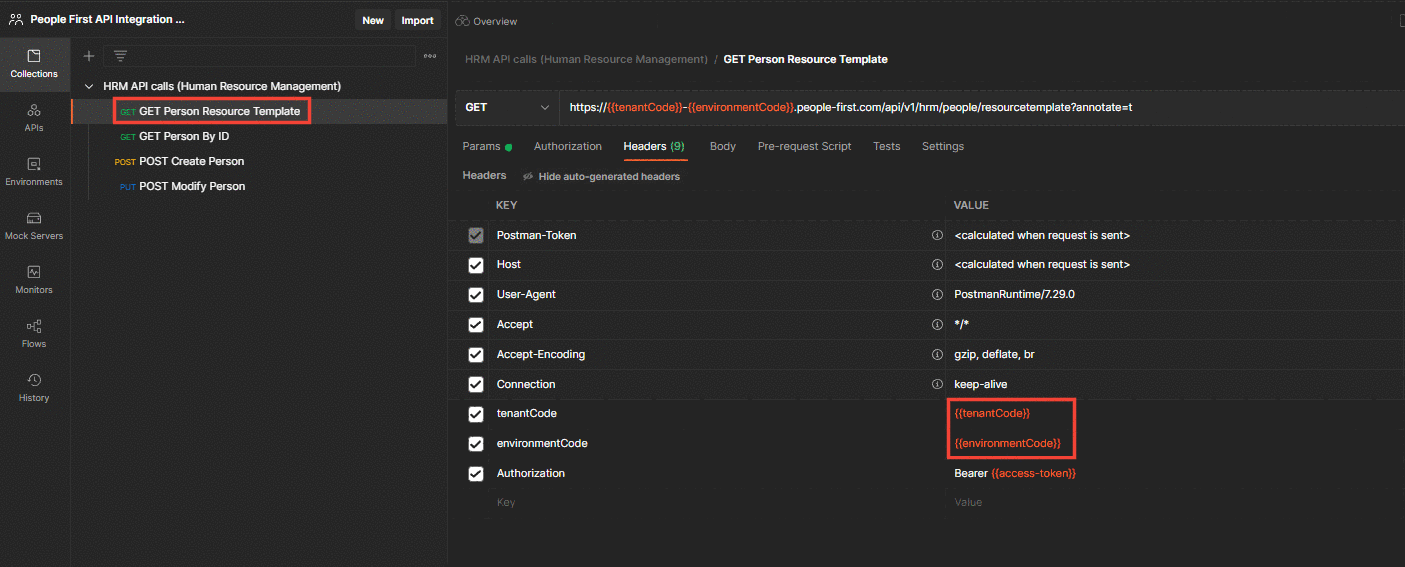
Here you will see the three important headers mentioned in the 'Human Resource Management Collection' section above. Ensure the values for these variables have been assigned in the 'Variables' section otherwise all the proceeding API calls will fail. You can check the value currently being carried through by the variable reference by hovering your mouse pointer over it to bring up an information box.
Now that all of our preliminary requirements are in place, press the 'Send' button to the right of the 'request URL' field.
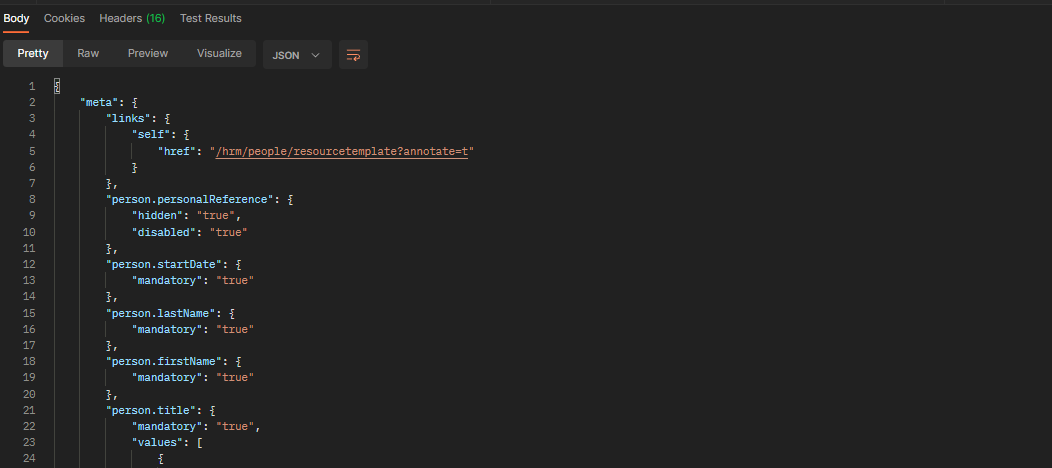
The successful call response will appear in a viewing pane at the bottom of the Postman app. Select the 'Body' tab from the available tabs just above the viewing pane if not already selected.
The top section of the response body contains the metadata, which provides various information relating to the person resource template class including which fields are mandatory when creating the class.
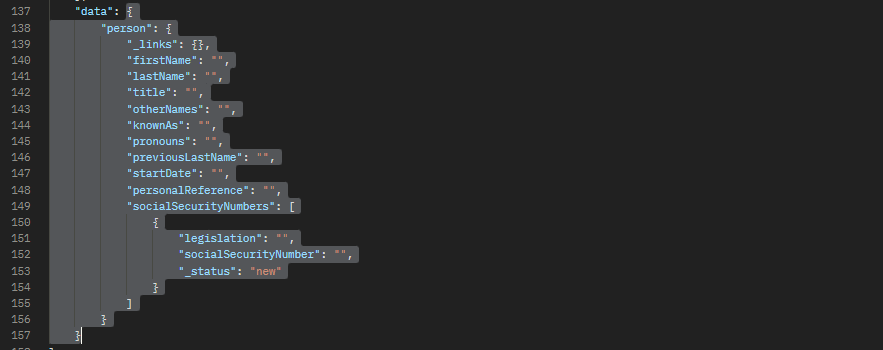
The "data" section can be found at the bottom of the response body, which is where we will find our Person Resource Template. As indicated in the image above click and drag from the curly brace immediately following "data" to the 'closing' curly brace for the data object (shown on line 157 in the example above), right-click and select 'copy'. The copied text will be required for the 'Create Person' API call.
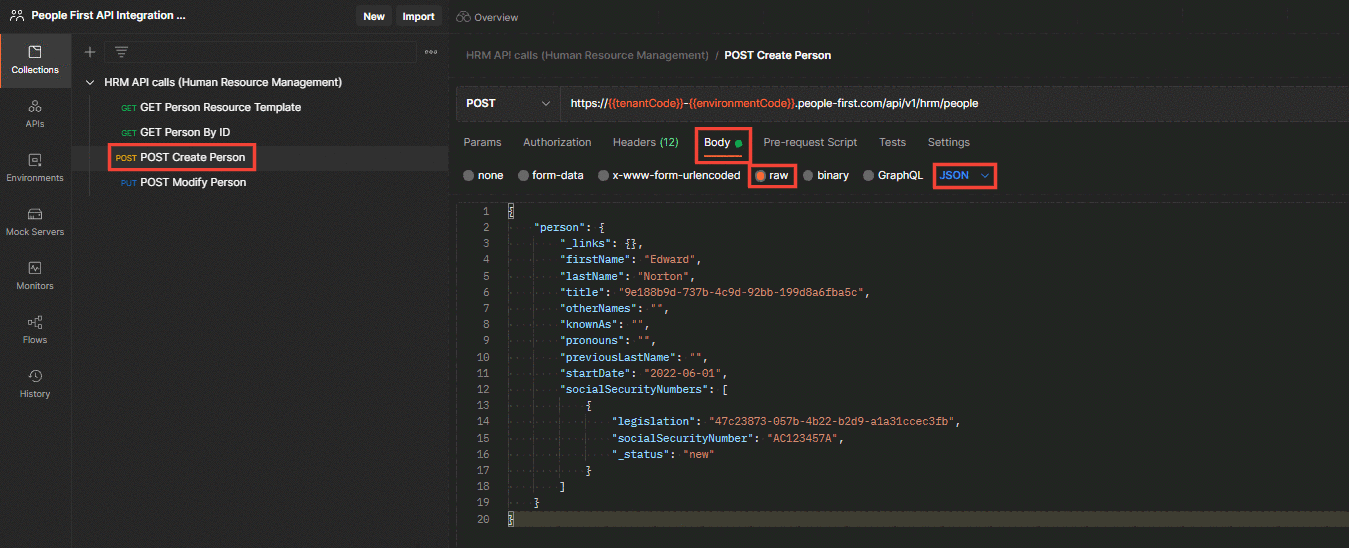
Now, as marked out above, navigate to 'POST Create Person' in the left navigation menu ➔ select 'Body' from the tabs above the viewing pane ➔ select 'raw' from the radio buttons below that ➔ and then select 'JSON' from the dropdown menu at the end of that row.
Paste your copied 'Person Resource Template' into the 'Body' viewing pane below your selected options as shown in the above image. Ensure you pasted object conforms to the same object structure as the one in the image.
The fields which have been assigned values in the example above are mandatory fields. This will be the minimum amount of assigned fields required for the create person API call to be successful. The remaining fields are not mandatory and can be assigned at a later date.
The fields "title" and "legislation" appear to have random values assigned to them. These are actually IDs which make reference to different titles and legislation. These IDs and their resulting values can be found in the 'Person Resource Template' metadata should you wish to change either of them. In the example above our title ID equals 'Mr', and our legislation ID equals 'United Kingdom'.
Once you have populated your data into the required fields, hit 'Send'.
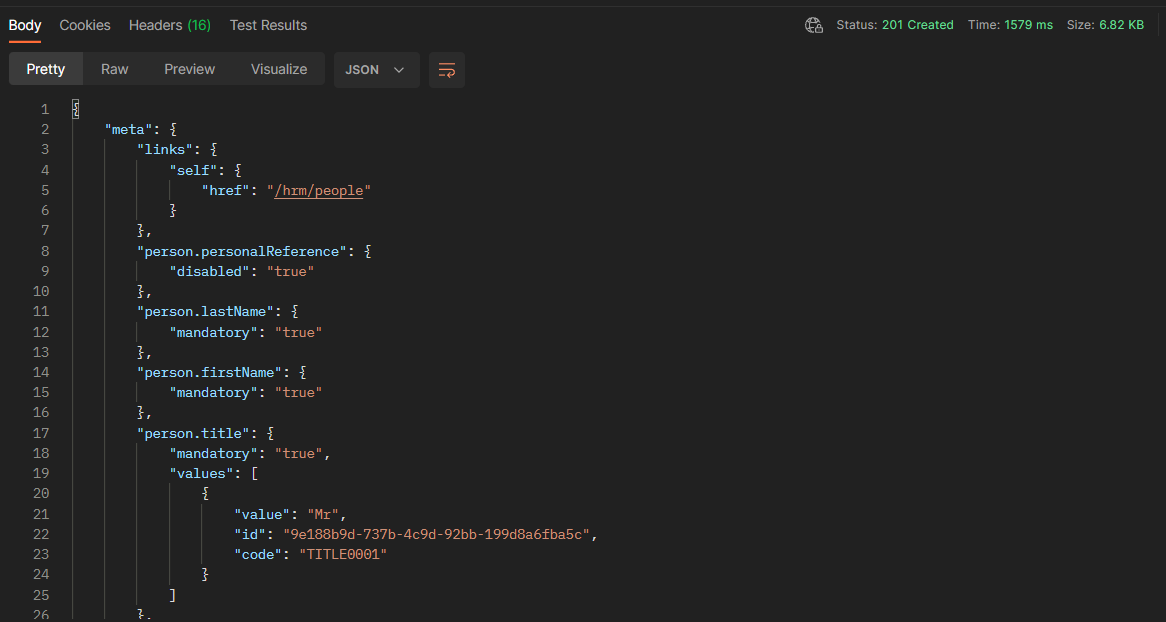
The above image shows the first section of the response. We know our call has been successful due to the '201 Created' status code in the top right-hand corner of the response viewing pane. Like with our 'Person Template' response the metadata displays information relating to our created person object. No metadata information will be displayed relating to any fields which were not assigned a value when the call was made.
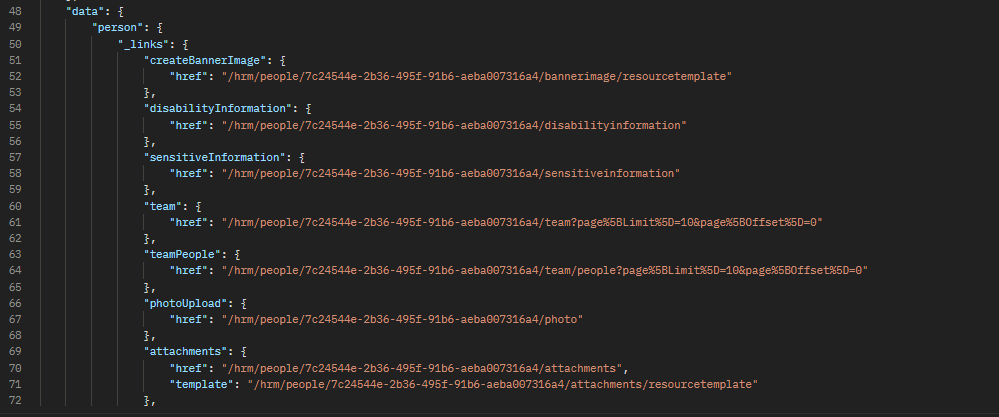
Various links can be found a little further down the response object in the data section. These links relate to actions which can be performed on the Person object which has just been created. The ID of the object has automatically been applied to the links to make further actions easier. Exploring these action links falls outside the scope of this demo.
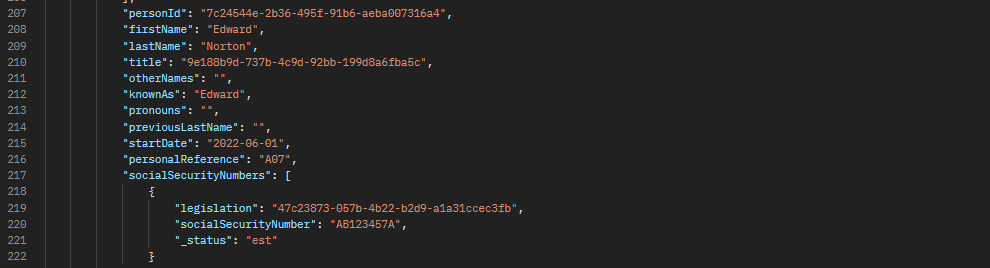
And finally at the bottom of the response object in the 'data' section is the created Person object. Three bits of information have been added / amended from the original request:
"personId": This field was not in the original create request, but has been added during creation and a randomly generated Id assigned to it. Take note of the Id or save a copy of the response for later use.
"personalReference": This field is part of the Person Template, but is not mandatory. A personal reference has automatically been applied when the Person object was created.
"_status": When the call was made this fields value was "new". Now that the object has been created the value is "est" meaning established.
In order to retrieve your created Person, or People if you have created more than one, you will require the 'personId'. Unless you kept on a note of this upon creation of the person by copying it from the response then you won't have this to hand. Fortunately there is an easy way to retrieve all of your created people along with their Ids and some other basic information.
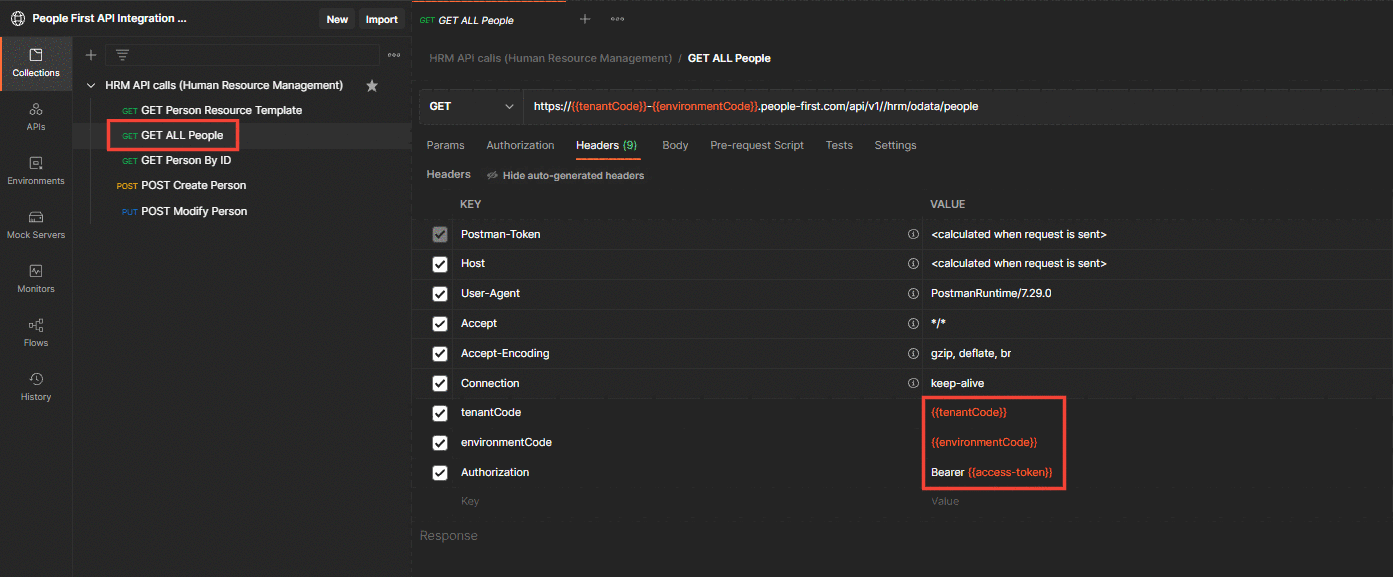
Click on 'GET ALL People' in the left-hand navigation menu in the Postman collection we have been using. As with the other calls if you navigate to the 'Headers' tab in the bar below the URI string you will be able to see that tenantCode, EnvironmentCode and your access-token are automatically added to your headers by the variables you set within the collection folder 'HRM API calls (Human Resource Management)'. Always check that your access-token retrieved from People First has not expired. If it has expired you will have to retrieve a new one.
Now hit the 'send' button as you have with the other calls.
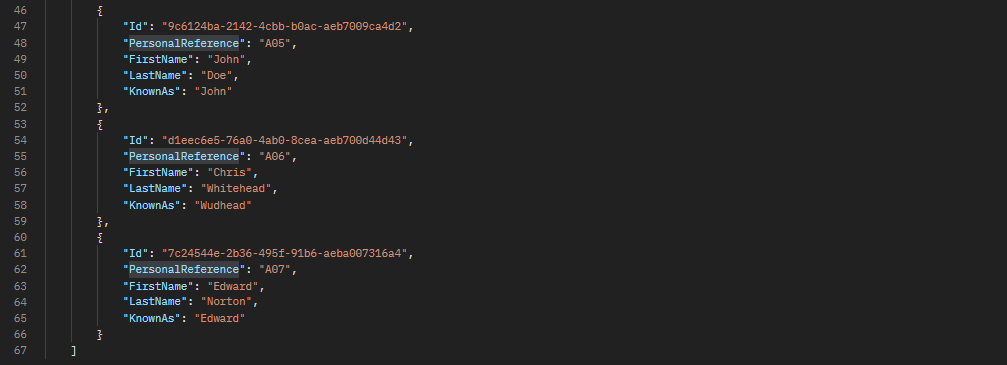
At the bottom of the response body you can see the person we created previously, Edward Norton. Other people had been created previous to this demonstration, so they are shown before our person Edward.
Our get all people call only provides a small bit of information on each person, but it contains the most vital piece of information about a person, the Id. The Id is required to perform other actions to a person through the API, like modify or delete a person. Save the response from this call, so you have easy access to the Id(s) for the next call, 'Get Person by Id'

Copy the Person Id you would like to do the API call on, make sure you exclude the enclosing quotation marks.
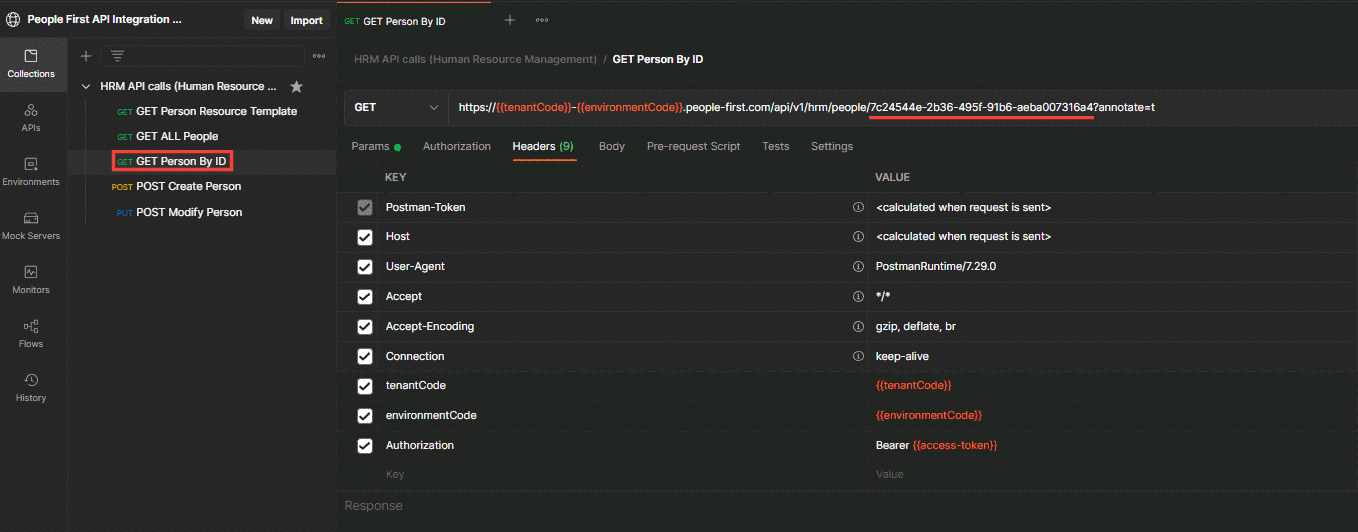
Within Postman, navigate to 'Get Person By Id' in the left-hand navigation menu within your collection. There will be a placeholder within the URI for the 'personId' which appears enclosed within two sets of curly braces highlighted in red as per the below extract. Replace the placeholder '{{personId}}' with the Id of the person you would like to get ensuring that 'annotate=t' is still included at the end of the URI. You can see underlined in red above that our Id has been pasted in.
https://{{tenantCode}}-{{environmentCode}}.people-first.com/api/v1/hrm/people/{{personId}}?annotate=t
Press 'send' to send the API request. You will receive a response body with the same structure as the json object below, but tailored to your person and their Id.
{
"meta": {
"links": {
"self": {
"href": "/hrm/people/7c24544e-2b36-495f-91b6-aeba007316a4?annotate=t"
}
},
"person.personalReference": {
"disabled": "true"
},
"person.lastName": {
"mandatory": "true"
},
"person.firstName": {
"mandatory": "true"
},
"person.title": {
"mandatory": "true",
"values": [
{
"value": "Dr",
"id": "cf14f246-385f-4fb3-b90f-a1254ef5520e",
"code": "TITLE0006"
},
{
"value": "Miss",
"id": "5175ae20-63d7-48e3-824d-72d35d1e960c",
"code": "TITLE0004"
},
{
"value": "Mr",
"id": "9e188b9d-737b-4c9d-92bb-199d8a6fba5c",
"code": "TITLE0001"
},
{
"value": "Mrs",
"id": "930fe73a-c2d5-446c-9819-75823d4fd7fe",
"code": "TITLE0005"
},
{
"value": "Ms",
"id": "77165d3e-aebb-41fd-891e-5fc7ce169ace",
"code": "TITLE0003"
},
{
"value": "Professor",
"id": "1a564fa5-4de3-4a6a-bca3-2869c20414eb",
"code": "TITLE0002"
}
]
},
"person.socialSecurityNumbers": {
"mandatory": "true",
"links": {
"template": {
"href": "/hrm/people/resourcetemplate?organisationId=00000000-0000-0000-0000-000000000000"
}
}
},
"person.socialSecurityNumbers.legislation": {
"mandatory": "true",
"values": [
{
"value": "Isle of Man",
"id": "6895aa29-fe9d-4ee8-a349-91f19554677f",
"code": "IOM"
},
{
"value": "Malaysia",
"id": "96bf4445-11fe-4ab2-910e-a34101d3a00a",
"code": "MYS"
},
{
"value": "Other",
"id": "909e4ce5-9acd-44b7-9d21-a9f671f45f62",
"code": "OTHER"
},
{
"value": "Republic of Ireland",
"id": "9f1a256d-6a8e-4d59-b7a6-e7b4e9dae64e",
"code": "ROI"
},
{
"value": "Singapore",
"id": "630de51f-f7c8-407c-8439-201ee9bbb6ee",
"code": "SG"
},
{
"value": "States of Guernsey",
"id": "b98ef498-d2e7-4d50-871a-7313253ef007",
"code": "SOG"
},
{
"value": "States of Jersey",
"id": "c23f94c9-232e-4875-a9e4-84d9d4a1ab57",
"code": "SOJ"
},
{
"value": "United Kingdom",
"id": "47c23873-057b-4b22-b2d9-a1a31ccec3fb",
"code": "UK"
},
{
"value": "United States of America",
"id": "b1291fff-e37c-4323-a395-812cfd159395",
"code": "US"
}
]
},
"person.socialSecurityNumbers.socialSecurityNumber": {
"mandatory": "true"
},
"person.startDate": {
"disabled": "true",
"hidden": "true"
},
"person.pronouns": {
"values": [
{
"value": "He/Him",
"id": "eefac58f-030e-419f-9bf0-4f454e79838d",
"code": "GP1"
},
{
"value": "She/Her",
"id": "6b43db2e-0de7-4238-870e-e0094afa1e49",
"code": "GP2"
},
{
"value": "They/Them",
"id": "cc0edab2-535c-4537-8fc9-68f95f077547",
"code": "GP3"
}
]
}
},
"data": {
"person": {
"_links": {
"createBannerImage": {
"href": "/hrm/people/7c24544e-2b36-495f-91b6-aeba007316a4/bannerimage/resourcetemplate"
},
"disabilityInformation": {
"href": "/hrm/people/7c24544e-2b36-495f-91b6-aeba007316a4/disabilityinformation"
},
"sensitiveInformation": {
"href": "/hrm/people/7c24544e-2b36-495f-91b6-aeba007316a4/sensitiveinformation"
},
"team": {
"href": "/hrm/people/7c24544e-2b36-495f-91b6-aeba007316a4/team?page%5BLimit%5D=10&page%5BOffset%5D=0"
},
"teamPeople": {
"href": "/hrm/people/7c24544e-2b36-495f-91b6-aeba007316a4/team/people?page%5BLimit%5D=10&page%5BOffset%5D=0"
},
"photoUpload": {
"href": "/hrm/people/7c24544e-2b36-495f-91b6-aeba007316a4/photo"
},
"attachments": {
"href": "/hrm/people/7c24544e-2b36-495f-91b6-aeba007316a4/attachments",
"template": "/hrm/people/7c24544e-2b36-495f-91b6-aeba007316a4/attachments/resourcetemplate"
},
"notes": {
"href": "/hrm/people/7c24544e-2b36-495f-91b6-aeba007316a4/notes",
"template": "/hrm/people/7c24544e-2b36-495f-91b6-aeba007316a4/notes/resourcetemplate"
},
"events": {
"href": "/hrm/people/7c24544e-2b36-495f-91b6-aeba007316a4/events"
},
"absenceTypes": {
"href": "/hrm/people/7c24544e-2b36-495f-91b6-aeba007316a4/absencetypes"
},
"contacts": {
"href": "/hrm/people/7c24544e-2b36-495f-91b6-aeba007316a4/contactinfo"
},
"absenceDisabledPeriods": {
"href": "/hrm/people/7c24544e-2b36-495f-91b6-aeba007316a4/globalAbsenceDisabledPeriods"
},
"createHolidayAbsence": {
"href": "/hrm/people/7c24544e-2b36-495f-91b6-aeba007316a4/absences/absencetypes/c7a9ef1a-69a3-4cf6-bd82-67a34d3a9c2d/resourcetemplate"
},
"createSicknessAbsence": {
"href": "/hrm/people/7c24544e-2b36-495f-91b6-aeba007316a4/absences/absencetypes/31467a35-a27b-45dd-be22-629816d9aa93/resourcetemplate"
},
"transfer": {
"href": "/hrm/people/7c24544e-2b36-495f-91b6-aeba007316a4/transferrequest/resourcetemplate"
},
"rightToWork": {
"href": "/hrm/people/7c24544e-2b36-495f-91b6-aeba007316a4/righttowork"
},
"passports": {
"href": "/hrm/people/7c24544e-2b36-495f-91b6-aeba007316a4/passports"
},
"residencyPermits": {
"href": "/hrm/people/7c24544e-2b36-495f-91b6-aeba007316a4/residencyPermits"
},
"emergencyContacts": {
"href": "/hrm/people/7c24544e-2b36-495f-91b6-aeba007316a4/emergencyContacts"
},
"createEmergencyContacts": {
"href": "/hrm/people/7c24544e-2b36-495f-91b6-aeba007316a4/friendsfamily/resourcetemplate"
},
"friendsFamily": {
"href": "/hrm/people/7c24544e-2b36-495f-91b6-aeba007316a4/friendsfamily"
},
"createFriendsFamily": {
"href": "/hrm/people/7c24544e-2b36-495f-91b6-aeba007316a4/friendsfamily/resourcetemplate"
},
"drivers": {
"href": "/hrm/people/7c24544e-2b36-495f-91b6-aeba007316a4/drivers"
},
"createDrivers": {
"href": "/hrm/people/7c24544e-2b36-495f-91b6-aeba007316a4/drivers/resourcetemplate"
},
"visas": {
"href": "/hrm/people/7c24544e-2b36-495f-91b6-aeba007316a4/visas"
},
"address": {
"href": "/hrm/people/7c24544e-2b36-495f-91b6-aeba007316a4/address"
},
"createAddress": {
"href": "/hrm/people/7c24544e-2b36-495f-91b6-aeba007316a4/address"
},
"peers": {
"href": "/hrm/people/7c24544e-2b36-495f-91b6-aeba007316a4/peers?page%5BLimit%5D=10&page%5BOffset%5D=0"
},
"personStatement": {
"href": "/hrm/people/7c24544e-2b36-495f-91b6-aeba007316a4/statement"
},
"editPersonStatement": {
"href": "/hrm/people/7c24544e-2b36-495f-91b6-aeba007316a4/statement"
},
"personManagerStatement": {
"href": "/hrm/people/7c24544e-2b36-495f-91b6-aeba007316a4/managerstatement"
},
"publicHolidays": {
"href": "/hrm/people/7c24544e-2b36-495f-91b6-aeba007316a4/publicholidays"
},
"employmentPeriods": {
"href": "/hrm/people/7c24544e-2b36-495f-91b6-aeba007316a4/employmentperiods"
},
"occupancies": {
"href": "/hrm/people/7c24544e-2b36-495f-91b6-aeba007316a4/occupancies"
},
"bankAccounts": {
"href": "/hrm/people/7c24544e-2b36-495f-91b6-aeba007316a4/bankaccounts"
},
"absenceProfile": {
"href": "/hrm/people/7c24544e-2b36-495f-91b6-aeba007316a4/absenceProfile"
},
"outOfOffice": {
"href": "/hrm/people/7c24544e-2b36-495f-91b6-aeba007316a4/colleagues/outofoffice"
},
"outOfOfficePeers": {
"href": "/hrm/people/7c24544e-2b36-495f-91b6-aeba007316a4/outofoffice/peers"
},
"outOfOfficeManagers": {
"href": "/hrm/people/7c24544e-2b36-495f-91b6-aeba007316a4/outofoffice/managers"
},
"employmentProfile": {
"href": "/hrm/people/7c24544e-2b36-495f-91b6-aeba007316a4/employmentProfile"
},
"employmentStatus": {
"href": "/hrm/people/7c24544e-2b36-495f-91b6-aeba007316a4/employmentstatus"
},
"editLeaveAllowance": {
"href": "/hrm/people/7c24544e-2b36-495f-91b6-aeba007316a4/absenceallowancedetails/effdate/2022-06-28"
},
"patternSchedule": {
"href": "/hrm/people/7c24544e-2b36-495f-91b6-aeba007316a4/patterntype/WP/schedule"
},
"absenceAllowanceScheme": {
"href": "/hrm/people/7c24544e-2b36-495f-91b6-aeba007316a4/absenceAllowanceScheme/effdate/2022-06-28"
},
"certificateOfSponsorships": {
"href": "/hrm/people/7c24544e-2b36-495f-91b6-aeba007316a4/sponsorshipcertificates"
},
"workPermits": {
"href": "/hrm/people/7c24544e-2b36-495f-91b6-aeba007316a4/workpermits"
},
"settlementStatuses": {
"href": "/hrm/people/7c24544e-2b36-495f-91b6-aeba007316a4/settlementstatuses"
},
"leaveOccupancy": {
"href": "/hrm/employmentperiods/38596d64-11c4-4525-9953-aeba007316d8"
},
"personSignatureHeld": {
"href": "/hrm/people/7c24544e-2b36-495f-91b6-aeba007316a4/signatureheld"
},
"self": {
"href": "/hrm/people/7c24544e-2b36-495f-91b6-aeba007316a4"
}
},
"personId": "7c24544e-2b36-495f-91b6-aeba007316a4",
"firstName": "Edward",
"lastName": "Norton",
"title": "9e188b9d-737b-4c9d-92bb-199d8a6fba5c",
"otherNames": "",
"knownAs": "Edward",
"pronouns": "",
"previousLastName": "",
"startDate": "2022-06-01",
"personalReference": "A07",
"socialSecurityNumbers": [
{
"legislation": "47c23873-057b-4b22-b2d9-a1a31ccec3fb",
"socialSecurityNumber": "AB123457A",
"_status": "est"
}
]
}
}
}