Image

In order to extract an initial set of people from People First for loading into a downstream system you can download a file from the Insight for Headcount screen (accessible by HR administrators).
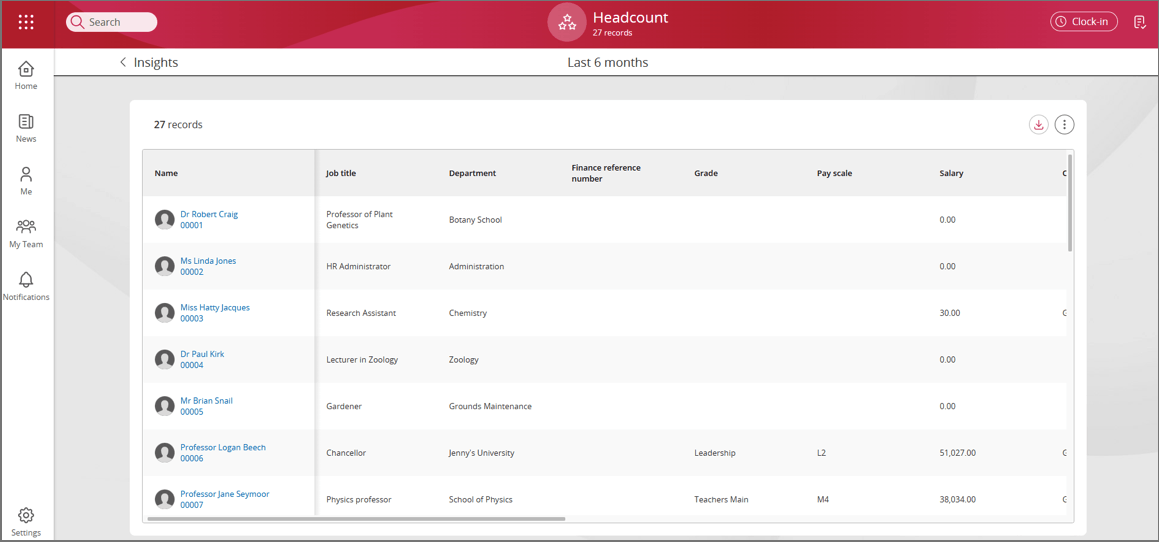
Note: Some of the columns may need to be deleted e.g. salary, expected occupancy end date, financial reference, grade and pay scale This file contains:
Alternatively the same information can be obtained using the following command:
GET PFBaseURL/api/v1/hrm/odata/people
RESPONSE:
{
  "value": [
    {
      "Id": "1",
      "PersonalReference": "ABC123",
      "FirstName": "John",
      "LastName": "Doe",
      "StartDate": "2024-04-22"
    },
    {
      "Id": "2",
      "PersonalReference": "DEF456",
      "FirstName": "Jane",
      "LastName": "Smith",
      "KnownAs": "Tommy"
    }
  ],
  "@odata.nextLink": "https://example.com/api/people?page=2"
}To get started using People First APIs look here: People First API - Quick Start Guides. This section includes a Postman integration collection to demonstrate getting People data using ODATA and APIs. People First API - API Documentation provides general guideance on the use of People First APIs.
To access people data use the HRM Integration user role in the creation of the access token. This provides access to HRM import endpoints and several HRM resource endpoints (e.g. People, Unit, Job, and Occupancy related).
There are a couple of methods to create people in People First from another system listed in the section on Applicant Tracking Systems.
This section provides general guidance in the use of ODATA.
Example: Sensitive data including gender
GET PFBaseURL/api/v1/hrm/odata/sensitiveInformations?$expand=LegalGender($expand=Translations)
RESPONSE (Example):
{
    "@odata.context": "https://devint.eu.peoplefirst-dev.com/api/v1/hrm/odata/$metadata#SensitiveInformations(LegalGender(Translations()))",
    "value": [
        {
            "FKPersonId": "8e68565c-d8f8-4740-8b81-b23500ad4c59",
            "Id": "5ae30373-acfd-41ee-bf30-b23500ad4c97",
            "DateOfBirth": "1999-11-20T00:00:00Z",
            "PreviousLastName": "",
            "AddressLine1": "67",
            "AddressLine2": "Merchants Court",
            "AddressLine3": "",
            "AddressLine4": "Ludlow",
            "AddressLine5": "",
            "AddressLine6": "SY8 1DA",
            "CompanyPhoneDialingCode": null,
            "CompanyNumber": null,
            "CompanyMobileDialingCode": null,
            "CompanyMobile": null,
            "PersonalPhoneDialingCode": null,
            "PersonalPhone": null,
            "PersonalMobileDialingCode": null,
            "PersonalMobile": null,
            "PersonalEmail": null,
            "CompanyEmail": null,
            "HasDisabilityInformation": false,
            "LegalGender": {
                "Id": "60b3a483-0212-474a-8d4e-2410b1b46df8",
                "Code": "M",
                "Type": "LegalGender",
                "Translations": [
                    {
                        "Id": "e2e9b550-dd88-4eb4-b123-46191c058e56",
                        "Value": "Male",
                        "Culture": ""
                    }
                ]
            }
        }
    ]
  }
Example: Occupancy including employment period
GET PFBaseURLapi/v1/hrm/odata/occupancies?%24expand=EmploymentPeriod
RESPONSE (Example):
{
    "@odata.context": "https://devint.eu.peoplefirst-dev.com/api/v1/hrm/odata/$metadata#Occupancies(EmploymentPeriod())",
    "value": [
        {
            "FKEmploymentPeriodId": "60f742e8-e1a0-4f65-9bf4-b23500ad4c62",
            "FKJobId": "ba2973cc-6b09-4e21-84be-b23500a2ef55",
            "Id": "eb030850-07d9-4351-afce-b23500add4b4",
            "StartDate": "2024-11-27T00:00:00Z",
            "EndDate": null,
            "ExpectedEndDate": null,
            "EmploymentPeriod": {
                "FKPersonId": "8e68565c-d8f8-4740-8b81-b23500ad4c59",
                "Id": "60f742e8-e1a0-4f65-9bf4-b23500ad4c62",
                "StartDate": "2024-11-27T00:00:00Z",
                "EndDate": null,
                "ReckonableServiceDate": null
            }
        }
    ]
 }