What is workforce management?
Workforce management refers to the processes and systems that organisations use to plan, coordinate and optimise their workforce. It covers areas such as employee scheduling, time and attendance, absence management, workforce planning and reporting.
This can range from recording when employees clock in and out, to forecasting future staffing needs based on demand.
It’s particularly relevant for organisations with shift-based, frontline or multi-site workforces, where coordinating people and working patterns is more complex. This commonly includes sectors such as retail, construction, manufacturing, healthcare and hospitality.
However, workforce management isn't limited to these sectors. Any organisation that needs to balance workforce availability and skills with changing business demands can benefit from a structured approach to workforce management.
Why is workforce management important?
Effective workforce management can be the difference between your organisation running efficiently or not. Get it right and you can improve productivity, control workforce costs and create a better experience for employees. Get it wrong and issues such as understaffing, unnecessary overtime, inefficient processes and compliance risks can arise.
The benefits of good workforce management include:
Improve productivity and efficiency
Having the right people available when and where they’re needed helps keep work running smoothly and reduces gaps in coverage.
Control workforce costs
Overstaffing, understaffing and unnecessary overtime can quickly increase workforce costs. Workforce management helps organisations align staffing more closely with demand and identify where resources could be used more efficiently.
Support compliance and reduce risk
Accurate records of working hours, overtime and working patterns can help organisations meet their legal responsibilities and identify potential risks.
Support the employee experience
How employees are scheduled and how their working time is managed has a direct impact on their day-to-day experience. Self-service tools can also make everyday tasks such as checking schedules or requesting leave easier.
Make better workforce decisions
Greater visibility of workforce data can help leaders identify trends in absence, overtime, staffing and demand, understand where there are gaps and plan more effectively for future requirements.
Key features of workforce management
While workforce management systems and strategies can vary, there are some core features that most organisations will need to manage their workforce effectively.
Employee scheduling and rostering
Scheduling and rostering helps organisations match the right people and skills to business demand. This means considering employee availability, skills, locations and working patterns to maintain appropriate coverage while avoiding unnecessary overstaffing or overtime.
Time and attendance
Time and attendance provides an accurate record of when employees work, including hours worked, overtime and variations from their scheduled hours. This gives organisations greater visibility of working patterns and provides reliable data that can feed into other areas, including payroll.
Leave and absence management
Managing planned and unplanned absence helps organisations understand who is available and where gaps in coverage may arise. It can also make it easier for employees to request leave and for managers to monitor absence patterns and their impact on the wider workforce.
Workforce planning and forecasting
Workforce planning and forecasting helps organisations anticipate how many people, and which skills, they will need as business demands change. Using historical workforce data alongside expected demand can help identify potential gaps and inform future resourcing decisions.
Analytics and reporting
Reporting brings workforce data together to provide greater visibility of areas such as staffing levels, overtime, absence and labour costs. Tracking these trends can help organisations identify issues earlier and make more informed decisions about how their workforce is planned and managed.
Workforce management strategy: best practices
A good workforce management strategy is about more than filling shifts or tracking working hours. It requires a consistent approach to understanding workforce demand, planning capacity and skills, managing working patterns and using workforce data to improve future decisions.
While there isn’t a single strategy or approach that will work for every organisation, we cover some best practices to follow below.
“Workforce management can never rely on a one-size-fits-all approach, because every workforce faces unique challenges. However, by following good practice and keeping a consistent approach, there are many benefits that you could take advantage of that will provide a return on investment for many years to come.”
Jeanette Wheeler, Chief HR Officer at MHR
Match workforce capacity and skills to demand
Effective workforce management starts with understanding what your organisation needs from its people. This means considering not only how many employees you need, but also the skills required, where they are needed and when.
CIPD describes workforce planning as balancing labour supply and skills against demand. Its guidance recommends analysing your existing workforce, identifying future requirements and understanding any gaps between the two.
Use this information to inform schedules, resourcing decisions and new hires, rather than simply repeating historical staffing patterns.
Build safe and sustainable schedules
A successful schedule needs to provide adequate coverage without overlooking the impact of working patterns on employees.
HSE guidance on managing shift work recommends considering factors such as shift length, overtime, shift swapping and adequate cover for absence when designing shift schedules. It also highlights the potential effects of long shifts and fatigue on alertness and performance.
Working-time requirements also need to be considered. For example, government guidance on rest breaks states that workers over 18 are generally entitled to 11 hours' rest between working days and a 20-minute uninterrupted break when working more than six hours, although exceptions apply.
Keep accurate records of working time
If your workforce is shift-based or works variable hours, keep accurate records of actual working time rather than relying on planned schedules. This can help you monitor overtime, spot problematic working patterns and maintain accurate payroll data.
Keeping accurate working time records can also support compliance. While employers don’t need to keep a record of all daily working hours, ACAS guidance states that employers must keep records to prove that working-time rules haven’t been broken.
Monitor overtime and recurring resourcing gaps
Don't look at overtime simply as an additional cost. Recurring overtime, frequent shift changes or ongoing difficulties finding cover can point to wider issues with workforce capacity, skills or scheduling.
Look for patterns across teams, locations and periods of high demand. Understanding why these issues keep occurring can help you decide whether schedules need adjusting, additional skills are required or workforce capacity needs to change.
Review and continuously improve
Workforce management shouldn't be a set-and-forget exercise. Demand, technology, skills and employee requirements will change over time, so regularly review how well your approach is working and where improvements can be made.
Look at trends in areas such as absence, overtime, staffing levels and labour costs, as well as how actual demand compares with your forecasts. Use these insights to identify recurring issues, adjust future plans and make better workforce decisions.
Use a robust workforce management system
Even the best workforce management strategy is difficult to maintain without the right technology to support it. Our research found that 39% of organisations still use paper sheets or manual forms to track time and attendance, while some managers report losing more than 1.5 days each month preparing time and attendance data for payroll.
As your workforce grows, relying on spreadsheets and manual processes makes it much harder to manage schedules, maintain accurate records and support compliance.
A robust workforce management system centralises your workforce data, automates tasks and gives managers better visibility. The system should support your workforce management strategy rather than dictate it, giving you the tools to put your processes into practice and adapt them as your needs change.
What is workforce management software?
Workforce management software is technology that helps organisations plan, manage and track their workforce from one central system. It brings together functions such as scheduling, time and attendance, absence management and workforce planning, reducing the need for manual records and admin.
By automating routine tasks and bringing workforce data together, workforce management platforms give managers and HR teams a clearer view of staffing, availability, working hours and costs. This makes it easier to respond to changes, maintain accurate records and make informed decisions.
It can improve the experience for employees, too. Self-service apps provide an easy way for them to see shifts, record their working hours and request holidays. If the platform connects with payroll, employees can also view real-time pay information and access their payslips in one place.
How to choose workforce management software
There are different workforce management software solutions available to suit different requirements. Some are standalone systems focused specifically on workforce management, while others are built into a unified HR, payroll and learning platform to provide an all-in-one system.
The right approach will depend on your workforce, existing technology and business requirements. When comparing solutions, consider:
- Workforce complexity: Can it support your locations, working patterns, skills, pay rules and staffing requirements?
- Integration: Does it connect with your existing HR, payroll and other business systems, or bring these functions together in one platform?
- Ease of use: Is it straightforward for employees and managers to use, including on mobile devices where needed?
- Reporting and insights: Does it give you useful visibility of areas such as absence, overtime, staffing and labour costs?
- Scalability: Can it continue to meet your needs as your organisation and workforce change?
- Implementation and support: What help is available with implementation, data migration, training and ongoing support?
Integration with HR and payroll
Workforce management doesn't operate in isolation. HR data can inform workforce planning and scheduling, while working hours, overtime, absence and other workforce data can directly affect payroll.
When these systems aren’t natively connected, teams may need to manually transfer or match up information between them. Our 2026/27 Payroll Report, based on a survey of 250 payroll managers and senior leaders, found that on average five hours a week are lost to operational challenges.
More than half (56%) reported duplicating data across numerous places, while 48% said they were piecing together data from different reports. Errors are common too, with 87% admitting to payroll mistakes that resulted in employees being paid incorrectly or late.
When choosing workforce management software, consider how workforce data will connect with HR and payroll. This could be through integrations with your existing systems or by choosing a unified platform that brings these functions together.
Manage your workforce with People First
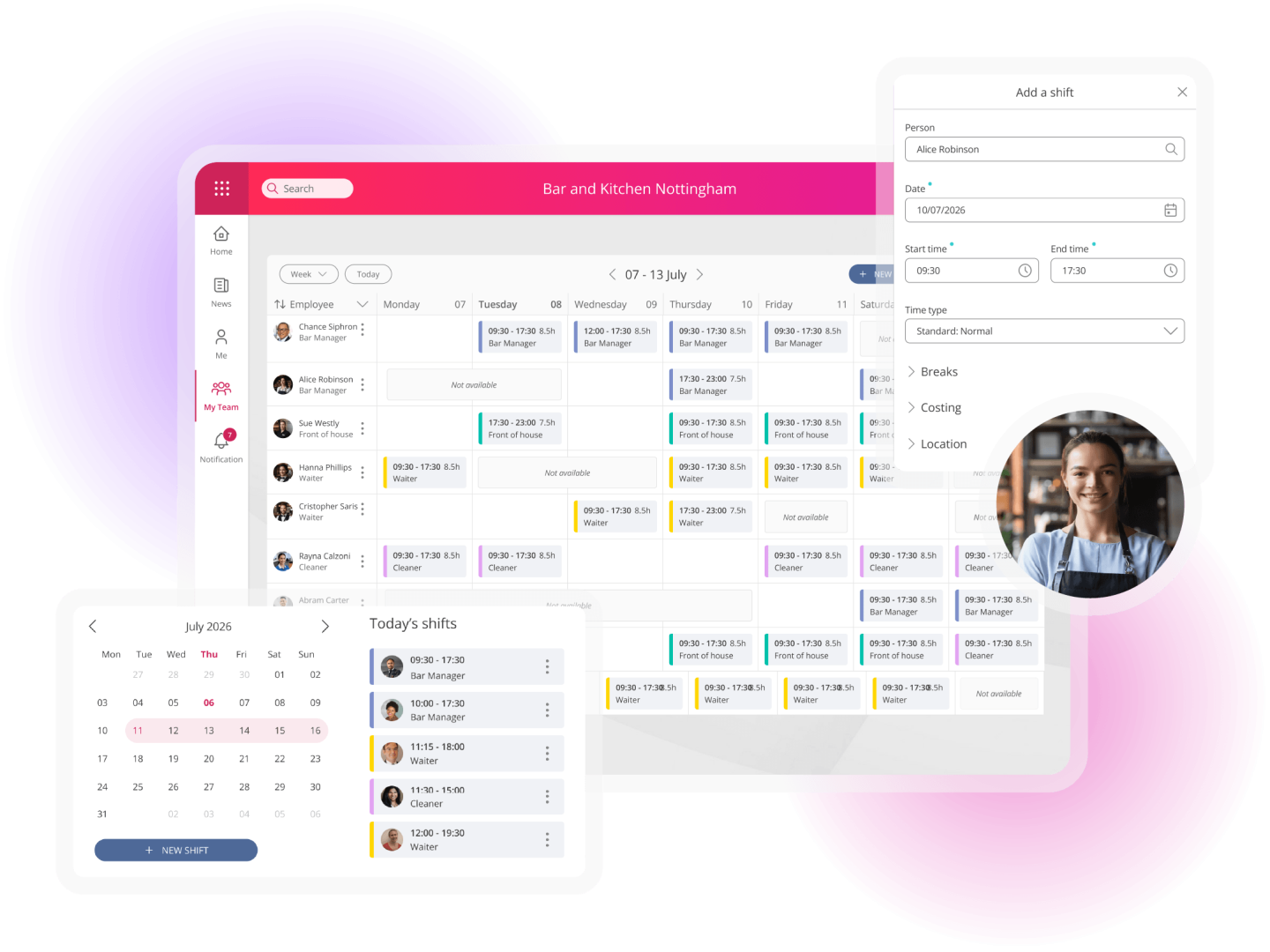
People First brings workforce management, HR, payroll and learning together in one platform, giving you a connected view of your people and workforce data.
With workforce management in People First, you can:
- Build skills-aware schedules: Plan around employees’ skills, qualifications, working patterns and absence, identify gaps in coverage and create schedules further in advance.
- Connect working time with payroll: Scheduled hours feed into People First’s time-recording engine, which can apply complex pay rules and inform payroll in real time.
- Give employees greater flexibility: Employees can clock in, view schedules and access payslips wherever they’re working through a cloud-based, mobile-first platform.
- Improve workforce visibility: Managers can monitor coverage and compliance, while leaders gain a clearer view of their workforce across different locations.
- Get faster answers from your workforce data: With AI built in, you can ask questions about your workforce data in natural language, making it easier to find the information you need and turn workforce data into useful insights.
Want to see how People First can help you manage your workforce more effectively? Book a demo to see it in action.