Image

Time data, clock in data or time pairs are data that are used to monitor worker activity and can be used as the basis of salary payment where it is based on an hourly rate.
People First has an integrated time clock.
There are many reasons why recording the actual times of work is required for a business including:
Time in People First allows your employees to record their actual start and end times and for this data to be extracted and sent to payroll.
It also allows managers to check the times and approve them, ensuring that payments made against time data have been checked and approved.
Note: Time recording is an add-on option and may incur additional charge. Please talk to your Account Manager if you are interested in using this functionality and they will arrange for the functionality to be switched on.
If using a third party clocking system (e.g. may be integrated with security and access systems) then People First APIs can be used to create and update time data in People First from that system.
See here on how to set up a People First Personal Access Token Rest API Integration.
In order to use a personal access token against a Time API, the WfmIntegration (Workforce Management Integration) role must be assigned to the 'Grant user role access to' setting.
The PAT is used in the API calls as an Authorization header API Requests.
Time data, alternatively known as 'clock in data' or 'Time pairs', can be created and updated externally using API calls.
There are 2 options:
The unique personId required for API calls can be resolved from People First using the following API:
GET PFBaseURL/api/v1/ta/people/personalreference/{personRefNum}
HEADERS:
RESPONSE:
{
    "meta": {
        "links": {
            "self": {
                "href": "/ta/people/personalreference/HNB123"
            }
        }
    },
    "data": {
        "peopleextended": {
            "_links": {
                "self": {
                    "href": "/ta/people/[person id]"
                },
                "thumbnail": {
                    "href": "/ta/people/[person id]/photo"
                }
            },
            "personId": "[person id]",
            "firstName": "First",
            "lastName": "Last",
            "knownAs": "TestUser",
            "photoId": "bcacc7c8-fe50-4cc5-af65-b65e3f065b3e"
        }
    }
}
All dates and times in People First should be issued in UTC ISO format (e.g. 2020-10-20T08:34:25Z) and accompanied by the local ISO timezone (e.g. Europe/London or Asia/Singapore).
The unique occupancy Id field value for creating and amending time pairs API calls can be resolved from People First using the following API. Effective date times parameters should correspond to time pair start/end date times to fetch correct occupancies within a range.
GET PFBaseURL/api/v1/ta/people/{personId}/occupancies? effectiveDateTimeFrom={dateTime}& effectiveDateTimeTo={dateTime?}
HEADERS:
RESPONSE:
{
    "meta": {
        "links": {
            "self": {
                "href": "/ta/people/[person id]/occupancies?effectiveDateTimeFrom=2025-05-12T12:00:00Z&effectiveDateTimeTo=2025-05-12T12:00:00Z"
            }
        }
    },
    "data": {
        "occupancy": [
            {
                "_links": {},
                "occupancyId": "19252599-d761-446f-80f4-b2d600619772",
                "jobName": "Force Compliance Officer"
            },
            {
                "_links": {},
                "occupancyId": "57abf2b6-a289-44be-8b76-b2d60061cef8",
                "jobName": "Portal Stability Specialist"
            }
        ]
    }
}
Clock records is a simple record of when a person starts work (clock ins) and ends work (clocks out). This information includes the source and the geolocation. The data is person-based so when a person works different shifts during the day, including work for different jobs and departments, they only need to clock in/out once.
People First will use their schedule to identify the different shifts and divide the period of the clock record accordingly. Employees, administrators and managers can still amend the time records from with People First if required.
This ensures a much easier process for the employee and reduces the amount of data that needs to be sent from one system to the other.
When a person clocks in via the clocking device;
Note: People first will not permit a clock record to be saved if it overlaps with another clock record or time record (that may have been created manually).
To use this option, select the “Compare with schedule” option on the Time settings page in Configuration.
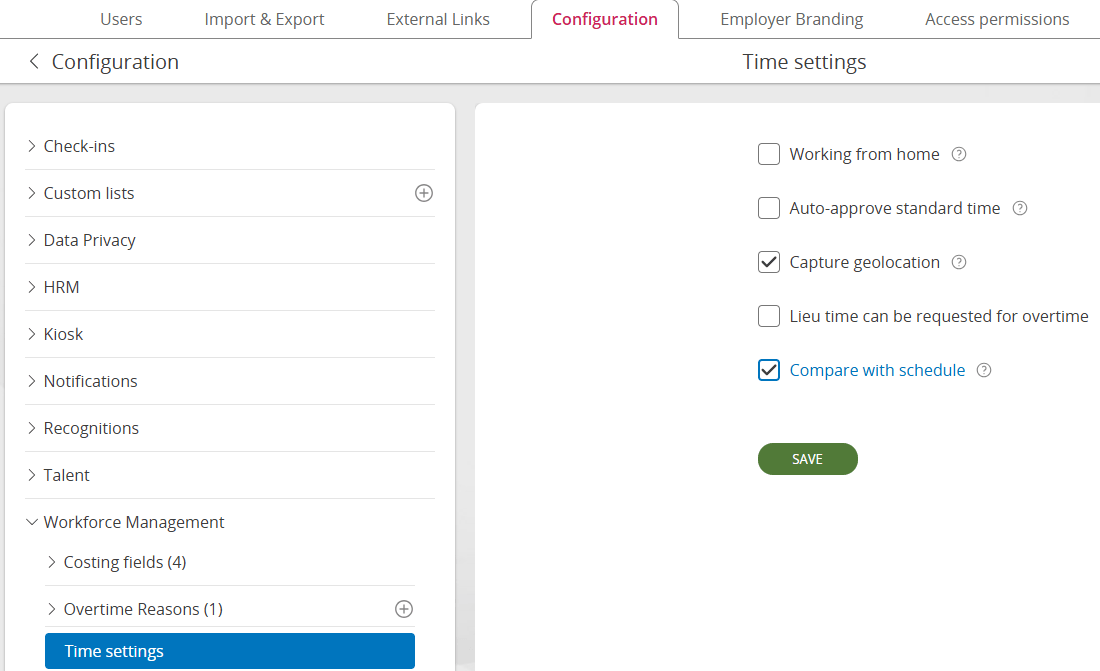
This option can be switched on/off for testing purposes.
Returns object with sensible data rules for the given person (e.g. timezone is mandatory). This is the input shape for POST
GET /api/person/{personId:guid}/clockRecords/resourceTemplate
Response 200 OK — ClockRecordResourceTemplate
Note: startTimestamp and endTimestamp are always null in the template — the client must supply the actual event time
{
  "_links": { },
  "_meta": { },
  "startTimestamp": null,
  "startTimeZone": null,
  "startSource": null,
  "startLongitude": null,
  "startLatitude": null,
  "startAccuracy": null,
  "endTimestamp": null,
  "endTimeZone": null,
  "endSource": null,
  "endLongitude": null,
  "endLatitude": null,
  "endAccuracy": null
}
Input: ClockRecordResourceTemplate — this the same shape returned by GET .../resourceTemplate, but with startTimestamp filled in by the client.
End* fields are optional but can be filled in, allowing a close clock record to be entered. This could be used in offline scenarios where historic data needs to be loaded
POST /api/person/{personId:guid}/clockRecords
Request Body — ClockRecordResourceTemplate
| Field | Type | Required | Description |
|---|---|---|---|
| startTimestamp | ISO 8601 Instant | No | Exact moment the person clocked in (UTC) |
| startTimeZone | string (IANA tz) | Yes | Local timezone at clock-in location |
| startSource | string | Yes | Event source (e.g. "Mobile", "Kiosk") |
| startLongitude | decimal | No | GPS longitude at clock-in |
| startLatitude | decimal | No | GPS latitude at clock-in |
| startAccuracy | decimal | No | GPS accuracy in metres at clock-in |
| endTimestamp | ISO 8601 Instant | No | Exact moment the person clocked out (UTC) |
| endTimeZone | string (IANA tz) | No | Local timezone at clock-out location |
| endSource | string | No | Event source (e.g. "Mobile", "Kiosk") |
| endLongitude | decimal | No | GPS longitude at clock-out |
| endLatitude | decimal | No | GPS latitude at clock-out |
| endAccuracy | decimal | No | GPS accuracy in metres at clock-out |
{
  "startTimestamp": "2026-02-24T07:00:00Z",
  "startTimeZone": "Europe/Warsaw",
  "startSource": "Mobile",
  "startLongitude": 21.0122,
  "startLatitude": 52.2297,
  "startAccuracy": 10.5,
  "endTimestamp": null,
  "endTimeZone": null,
  "endSource": null,
  "endLongitude": null,
  "endLatitude": null,
  "endAccuracy": null
}
Response 201 Created
Location: /api/person/{personId}/clockRecords/{newClockRecordId}
Response body: ClockRecordResource (same shape as GET single).
{
  "_links": { },
  "_meta": { },
  "id": "3fa85f64-5717-4562-b3fc-2c963f66afa6",
  "personId": "8e4b3a91-1234-4f00-b123-000000000001",
  "startTimestamp": "2026-02-24T07:00:00Z",
  "startTimeZone": "Europe/Warsaw",
  "startSource": "Mobile",
  "startLongitude": 21.0122,
  "startLatitude": 52.2297,
  "startAccuracy": 10.5,
  "endTimestamp": null,
  "endTimeZone": null,
  "endSource": null,
  "endLongitude": null,
  "endLatitude": null,
  "endAccuracy": null,
  "processingStatus": "Open",
  "version": 1
}
Input: ClockRecordResource — the same shape returned by GET .../clockRecords/{id}. The client takes the full resource as returned from a prior GET (or from the POST response), modifies the fields they want to change, and sends it back.
PUT covers three use cases:
PUT /api/person/{personId:guid}/clockRecords/{clockRecordId:guid}If-Match This is required — This a concurrency token; the value of the version field from the last GET response
Request Body — ClockRecordResource
| Field | Type | Required | Description |
|---|---|---|---|
| id | guid | Yes | Identity of the record being updated |
| personId | guid | Yes | Identity of the person |
| startTimestamp | ISO 8601 Instant | Yes | Exact moment the person clocked in (UTC) |
| startTimeZone | string (IANA tz) | Yes | Local timezone at clock-in location |
| startSource | string | Yes | Event source (e.g. "Mobile", "Kiosk") |
| startLongitude | decimal | No | GPS longitude at clock-in |
| startLatitude | decimal | No | GPS latitude at clock-in |
| startAccuracy | decimal | No | GPS accuracy in metres at clock-in |
| endTimestamp | ISO 8601 Instant | No | Exact moment the person clocked out; null = Undo Clock Out Must be at least 1 minute after the start time |
| endTimeZone | string (IANA tz) | No | Local timezone at clock-out; null = Undo Clock Out |
| endSource | string | No | Event source (e.g. "Mobile", "Kiosk") |
| endLongitude | decimal | No | GPS longitude at clock-out |
| endLatitude | decimal | No | GPS latitude at clock-out |
| endAccuracy | decimal | No | GPS accuracy in metres at clock-out |
| processingStatus | string | No | Read-only — ignored by server if sent |
| version | int | Yes | Must match If-Match header; used for optimistic concurrency |
{
  "id": "3fa85f64-5717-4562-b3fc-2c963f66afa6",
  "personId": "8e4b3a91-1234-4f00-b123-000000000001",
  "startTimestamp": "2026-02-24T07:00:00Z",
  "startTimeZone": "Europe/Warsaw",
  "startSource": "Mobile",
  "startLongitude": 21.0122,
  "startLatitude": 52.2297,
  "startAccuracy": 10.5,
  "endTimestamp": "2026-02-24T15:30:00Z",
  "endTimeZone": "Europe/Warsaw",
  "endSource": "Mobile",
  "endLongitude": 21.0130,
  "endLatitude": 52.2300,
  "endAccuracy": 8.0,
  "processingStatus": "Open",
  "version": 1
}
Take the resource as-is from GET, set all End* fields to null:
{
  "id": "3fa85f64-5717-4562-b3fc-2c963f66afa6",
  "personId": "8e4b3a91-1234-4f00-b123-000000000001",
  "startTimestamp": "2026-02-24T07:00:00Z",
  "startTimeZone": "Europe/Warsaw",
  "startSource": "Mobile",
  "startLongitude": 21.0122,
  "startLatitude": 52.2297,
  "startAccuracy": 10.5,
  "endTimestamp": null,
  "endTimeZone": null,
  "endSource": null,
  "endLongitude": null,
  "endLatitude": null,
  "endAccuracy": null,
  "processingStatus": "Processed",
  "version": 2
}
When the server receives a PUT with all End* fields as null on a record that previously had endTimestamp set, the domain clears the clock-out data and reopens the record. No separate action or endpoint is required.
Response 200 OK
Response body: ClockRecordResource reflecting the updated state.
{
  "_links": { },
  "_meta": { },
  "id": "3fa85f64-5717-4562-b3fc-2c963f66afa6",
  "personId": "8e4b3a91-1234-4f00-b123-000000000001",
  "startTimestamp": "2026-02-24T07:00:00Z",
  "startTimeZone": "Europe/Warsaw",
  "startSource": "Mobile",
  "startLongitude": 21.0122,
  "startLatitude": 52.2297,
  "startAccuracy": 10.5,
  "endTimestamp": "2026-02-24T15:30:00Z",
  "endTimeZone": "Europe/Warsaw",
  "endSource": "Mobile",
  "endLongitude": 21.0130,
  "endLatitude": 52.2300,
  "endAccuracy": 8.0,
  "processingStatus": "Processed",
  "version": 2
}| Status | Condition |
|---|---|
| 400 Bad Request | Business rule violation (e.g. endTimestamp is before startTimestamp) |
| 404 Not Found | Resource not found |
| 409 Conflict | version in If-Match does not match the stored version (optimistic concurrency violation) |
Permanently removes a Clock Record. Only open (not yet processed) records can be deleted — enforced by domain rules.
DELETE /api/person/{personId:guid}/clockRecords/{clockRecordId:guid}
Headers
If-Match is required. This is a concurrency token; the value of the version field from the last GET response
Response 204 No Content
GET /api/person/{personId:guid}/clockRecords
| Parameter | Type | Required | Description |
|---|---|---|---|
| viewStartDateTime | ISO 8601 Instant | No | Range filter — start (inclusive) |
| viewEndDateTime | ISO 8601 Instant | No | Range filter — end (inclusive) |
Response 200 OK
{
  "clockRecord": [
    {
      "_links": { },
      "_meta": { },
      "id": "3fa85f64-5717-4562-b3fc-2c963f66afa6",
      "personId": "8e4b3a91-1234-4f00-b123-000000000001",
      "startTimestamp": "2026-02-24T07:00:00Z",
      "startTimeZone": "Europe/Warsaw",
      "startSource": "Mobile",
      "startLongitude": 21.0122,
      "startLatitude": 52.2297,
      "startAccuracy": 10.5,
      "endTimestamp": "2026-02-24T15:30:00Z",
      "endTimeZone": "Europe/Warsaw",
      "endSource": "Mobile",
      "endLongitude": 21.0130,
      "endLatitude": 52.2300,
      "endAccuracy": 8.0,
      "processingStatus": "Processed",
      "version": 2
    }
  ]
}
Response 200 OK
{
  "_links": { },
  "_meta": { },
  "id": "3fa85f64-5717-4562-b3fc-2c963f66afa6",
  "personId": "8e4b3a91-1234-4f00-b123-000000000001",
  "startTimestamp": "2026-02-24T07:00:00Z",
  "startTimeZone": "Europe/Warsaw",
  "startSource": "Mobile",
  "startLongitude": 21.0122,
  "startLatitude": 52.2297,
  "startAccuracy": 10.5,
  "endTimestamp": null,
  "endTimeZone": null,
  "endSource": null,
  "endLongitude": null,
  "endLatitude": null,
  "endAccuracy": null,
  "processingStatus": "Open",
  "version": 1
}
Time records record all the necessary information about this working time, allowing managers to check the times and providing information for payroll and finance about how to pay and cost this work.
The data is person and occupancy (job) based and both pieces of information are required. The person must be an active employee and assigned to the job specified on the start date of the time record.
This option is useful when the source system can provide additional data e.g. work reference, cost code or rate of pay. If the only data being sent relates to the clock in/out, option 1 is recommended.
Time records and clock records can co-exist in the system but they cannot overlap.
To create a time pair, you must first retrieve the time pair resource template to get information about mandatory fields and all available data to use.
GET PFBaseURL/api/v1/ta/actualshifttimepairs/person/{personId}/resourcetemplate?annotate=t
HEADERS:
RESPONSE:
{
  "meta": {
    "links": {
      "self": {
        "href": "/ta/actualshifttimepairs/person/{person id}/resourcetemplate?annotate=t"
      }
    },
    "actualShiftTimePair.timePairType": {
      "mandatory": "true",
      "values": [
        {
          "value": "Overtime",
          "id": "4f2a433b-2fa5-44ad-aadc-4ec39097e15a"
        },
        {
          "value": "Standard",
          "id": "47d7ae8a-2cd2-4e3d-b5e4-b5e3d68574e4"
        }
      ]
    },
    "actualShiftTimePair.startDateTime": {
      "mandatory": "true"
    },
    "actualShiftTimePair.startTimeZone": {
      "mandatory": "true"
    }
  },
  "data": {
    "actualShiftTimePair": {
      "_links": {
        "create": {
          "href": "/ta/actualshifttimepairs/person/{person id}"
        },
        "self": {
          "href": "/ta/actualshifttimepairs/person/{person id}/resourcetemplate"
        }
      },
      {
  "meta": {
    "links": {
      "self": {
        "href": "/ta/actualshifttimepairs/person/{person id}/resourcetemplate?annotate=t"
      }
    },
    "actualShiftTimePair.timePairType": {
      "mandatory": "true",
      "values": [
        {
          "value": "Overtime",
          "id": "4f2a433b-2fa5-44ad-aadc-4ec39097e15a"
        },
        {
          "value": "Standard",
          "id": "47d7ae8a-2cd2-4e3d-b5e4-b5e3d68574e4"
        }
      ]
    },
    "actualShiftTimePair.startDateTime": {
      "mandatory": "true"
    },
    "actualShiftTimePair.startTimeZone": {
      "mandatory": "true"
    }
  },
  "data": {
    "actualShiftTimePair": {
      "_links": {
        "create": {
          "href": "/ta/actualshifttimepairs/person/{person id}"
        },
        "self": {
          "href": "/ta/actualshifttimepairs/person/{person id}/resourcetemplate"
        }
         "occupancies": {
                    "href": "/ta/people/{person id}/occupancies"
                }
      },
      "clockRecordId": "",
      "occupancyId": "",
      "startDateTime": "",
      "startTimeZone": "Europe/London",
      "startLatitude": "",
      "startLongitude": "",
      "startAccuracy": "",
      "startSource": "",
      "endDateTime": "",
      "endTimeZone": "Europe/London",
      "endLatitude": "",
      "endLongitude": "",
      "endAccuracy": "",
      "endSource": "",
      "timeTypeItemId": "",
      "rateOfPay": "",
      "currencyIsoCode": "",
      "workingFromHome": false,
      "timeOffInLieu": false,
      "overtimeReasonId": "",
      "overtimeReasonDetails": "",
      "substitutedOccupancyId": "",
      "departmentId": "",
      "financeReferenceNumberId": "",
      "locationId": "",
      "workTypeId": "",
      "externalLocationId": "",
      "workReference": "",
      "customer": ""
      "breakDuration": ""
    }
  }
}
Response codes for GET
Success Response Code: 200
Error Response Code: 400 covers “record not found” or authentication issues.
Use this to create a time record when the person clocks in
POST PFBaseURL/api/v1/ta/actualshifttimepairs/person/{personId}
HEADERS:
BODY:
{
    "actualShiftTimePair": {
        "startDateTime": "2025-03-06T11:22:00Z",
        "startTimeZone": "Europe/London",
        "startLatitude": "",
        "startLongitude": "",
        "startAccuracy": "",
        "startSource": "Web",
        "endDateTime": "2025-03-06T11:23:00Z",
        "endTimeZone": "Europe/London",
        "endLatitude": "",
        "endLongitude": "",
        "endAccuracy": "",
        "endSource": "Web",
        "rateOfPay": null,
        "workingFromHome": false,
        "timeOffInLieu": false,
        "overtimeReasonDetails": "",
        "timeTypeItemId": "7473d6d9-3f62-4d33-97f9-cf7e6355caca",
        "overtimeReasonId": "",
        "workTypeId": "",
        "currencyIsoCode": "",
        "jobTitleId": "",
        "departmentId": "",
        "financeReferenceNumberId": "",
        "locationId": "",
        "externalLocationId": "",
        "workReference": "",
        "customer": "",
        "occupancyId": "47d7ae8a-2cd2-4e3d-b5e4-b5e3d68574e4"
    }
}
Response codes for POST
Success Response Code: 201
Concurrency error: 409
If-Match missing/invalid: 412
Error Response Code: 400
This should be followed to update the time record when the person clocks out.
To amend a time pair, you must first retrieve the time pair to obtain the ETag header. This is a concurrency protection to prevent overwriting of changes made by another caller. The ETag header value should be copied and applied to the update API call as an If-Match header.
There is also a possibility of retrieving all available data for amending the time pair. To achieve this expand the url with “annotate=t” as per the resource template step.
GET PFBaseURL/api/v1/ta/actualshifttimepairs/{timePairId}
HEADERS:
RESPONSE:
{
    "meta": {
        "links": {
            "self": {
                "href": "/ta/actualshifttimepairs/bf4acb54-587a-4fad-aecb-b35900f53c15"
            }
        },
        "actualShiftTimePair.startTimeEntryType": {
            "values": [
                {
                    "value": "Manual",
                    "id": "1"
                }
            ]
        },
        "actualShiftTimePair.endTimeEntryType": {
            "values": [
                {
                    "value": "Manual",
                    "id": "1"
                }
            ]
        },
        "actualShiftTimePair.approvalState": {
            "values": [
                {
                    "value": "Awaiting Approval",
                    "id": "0"
                }
            ]
        },
        "actualShiftTimePair.timeTypeItemId": {
            "values": [
                {
                    "rateOfPay": "",
                    "currencyIsoCode": "",
                    "value": "Standard - Time paid by hour",
                    "active": true,
                    "code": "",
                    "relatedResources": "",
                    "version": 5,
                    "id": "7473d6d9-3f62-4d33-97f9-cf7e6355caca",
                    "identifier": "7473d6d9-3f62-4d33-97f9-cf7e6355caca"
                }
            ]
        },
        "actualShiftTimePair.currencyIsoCode": {
            "values": []
        }
    },
    "data": {
        "actualShiftTimePair": {
            "_links": {
                "change": {
                    "href": "/ta/actualshifttimepairs/bf4acb54-587a-4fad-aecb-b35900f53c15"
                },
                "delete": {
                    "href": "/ta/actualshifttimepairs/bf4acb54-587a-4fad-aecb-b35900f53c15"
                },
                "self": {
                    "href": "/ta/actualshifttimepairs/bf4acb54-587a-4fad-aecb-b35900f53c15"
                },
                "latestTimePair": {
                    "href": "/ta/actualshifttimepairs/07b6ab8c-9cbe-4802-a7d5-b2b300e06bc7"
                },
                "clockIn": {
                    "href": "/ta/clockin/resourcetemplate"
                },
                "occupancies": {
                    "href": "/ta/people/366f70ca-c356-4374-b67d-b24c0117b4cb/occupancies"
                }
            },
            "id": "bf4acb54-587a-4fad-aecb-b35900f53c15",
            "hrmPersonId": "366f70ca-c356-4374-b67d-b24c0117b4cb",
            "occupancyId": "c5ad6b75-12d6-4867-a6a3-b24c0117f4b3",
            "jobTitle": "",
            "firstName": "Susanne",
            "lastName": "Mills",
            "startDateTime": "2025-03-30T08:00:00Z",
            "startTimeZone": "Europe/London",
            "startLatitude": "",
            "startLongitude": "",
            "startAccuracy": "",
            "startTimeEntryType": 1,
            "endDateTime": "2025-03-30T16:00:00Z",
            "endTimeZone": "Europe/London",
            "endLatitude": "",
            "endLongitude": "",
            "endAccuracy": "",
            "startSource": "WFM_Test",
            "endSource": "WFM_Test",
            "endTimeEntryType": 1,
            "timeTypeItemId": "7473d6d9-3f62-4d33-97f9-cf7e6355caca",
            "rateOfPay": "",
            "currencyIsoCode": "",
            "approvalState": 0,
            "workingFromHome": false,
            "timeOffInLieu": false,
            "overtimeReasonId": "",
            "overtimeReasonDetails": "",
            "substitutedOccupancyId": "",
            "departmentId": "ab127b01-946c-485b-984f-b2a500ebf26e",
            "financeReferenceNumberId": "",
            "locationId": "",
            "workTypeId": "",
            "externalLocationId": "",
            "workReference": "",
            "customer": ""
        }
    }
}PUT PFBaseURL/api/v1/ta/actualshifttimepairs/{timePairId}
HEADERS:
BODY:
{
    "actualShiftTimePair": {
            "occupancyId": "c5ad6b75-12d6-4867-a6a3-b24c0117f4b3",
            "startDateTime": "2025-03-30T08:00:00Z",
            "startTimeZone": "Europe/London",
            "startLatitude": "",
            "startLongitude": "",
            "startAccuracy": "",
            "startSource": "WFM_Test",
            "endDateTime": "2025-03-30T16:00:00Z",
            "endTimeZone": "Europe/London",
            "endLatitude": "",
            "endLongitude": "",
            "endAccuracy": "",
            "endSource": "WFM_Test",
            "timeTypeItemId": "7473d6d9-3f62-4d33-97f9-cf7e6355caca",
            "rateOfPay": "",
            "currencyIsoCode": "",
            "workingFromHome": false,
            "timeOffInLieu": false,
            "overtimeReasonId": "",
            "overtimeReasonDetails": "",
            "substitutedOccupancyId": "",
            "departmentId": "ab127b01-946c-485b-984f-b2a500ebf26e",
            "financeReferenceNumberId": "",
            "locationId": "",
            "workTypeId": "",
            "externalLocationId": "",
            "workReference": "",
            "customer": ""
    }
}
Response codes for PUT
Success Response Code: 200
Concurrency error: 409
If-Match missing/invalid: 412
Error Response Code: 400 plus accompanying text explaining the issue.
In order to delete a time pair, the unique id of that time pair is required and included on the API route.
You must first retrieve the time pair to obtain the ETag header. This is a concurrency protection to prevent overwriting of changes made by another caller. The ETag header value should be copied and applied to the update API call as an If-Match header.
DELETE PFBaseURL/api/v1/ta/actualshifttimepairs/{timePairId}
HEADERS:
Response codes for DELETE
Success Response Code: 204
Error Response Code: 400 plus accompanying text explaining the issue.
Concurrency error: 409
If-Match missing/invalid: 412