Image

HR systems provide the data needed to pay employees. Often HR and payroll are integrated systems as is the case with People First | Real-Time Payroll
Where there are separate HR and payroll systems then there is need for interfaces between these systems. The data flows at a high level could be as shown below:
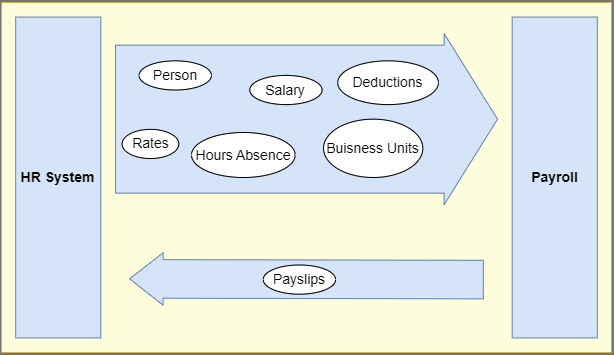
There are a range of APIs available with People First that can be used to integrate with a payroll system. These are described here: External Payroll Integration
Import APIs can be called to load payroll data into People First. This results in fewer API calls but does require polling to check when import files have validated and imported. The import APIs can handle multiple import records at once. Also, any import files can be viewed within People First (by admin users) so any files failing validation can be fixed and re-imported. The People First imports relevant to payroll are:
Each import listed above has a different file import layout. The import file templates can be downloaded within People First – these provide guidance on filling in the fields including which ones are mandatory. They can also be accessed via API:
GET PFBaseURL/api/v1/payroll/importtemplate
This responds with a list of templates. { "data": { "importTemplate": [ { "code": "AttachPeopleToPayrollUK",...
With a template specified the API responds with the layout and guidance
GET PFBaseURL/api/v1/payroll/importtemplates/AddClaimsUK
The import APIs take the file contents and firstly validate the contents and import the data if the file content passes validation. The loading of the files is recorded in People First in the Administration->Imports and Exports->Imports area. The process of importing for each import type is the same and will be described below with examples.
These are the general steps for an external application to call a People First import API:
Example:
POST PFBaseURL/api/v1/payroll/importsessions/AddClaimsUK
GET PFBaseURL/api/v1/payroll/importsessions/f5104ba7-04d1-4c25-b3e9-b323009ed260
GET PFBaseURL/api/v1/payroll/importsessions/f5104ba7-04d1-4c25-b3e9-b323009ed260/validationfailures`
POST PFBaseURL/api/v1/payroll/importsessions/importing`
Body: { "importsessions": { "id": "2bfdf32a-b5c7-4a2a-855f-b32b009c0b0d" } }
GET PFBaseURL/api/v1/payroll/importsessions/2bfdf32a-b5c7-4a2a-855f-b32b009c0b0d`
Response:
"data": {
        "importsessions": {
            "id": "2bfdf32a-b5c7-4a2a-855f-b32b009c0b0d",
            "documentName": "Pension_people_41.csv",
            "code": "PensionsForPeople",
            "initiatorSystemUserId": "ff67003a-7b5e-4330-abf3-b23400d8ece5",
            "importerSystemUserId": null,
            "initiatorPersonId": "210a932b-31ff-446e-8f94-b23500ae6f76",
            "importerPersonId": null,
            "lastUpdated": "2025-07-31T09:28:08.1468911Z",
            "validationSuccessCount": 0,
            "importSuccessCount": 34,
            "validationFailureCount": 0,
            "importFailureCount": 0,
            "completionStatus": "Imported",
            "startTime": "2025-07-31T09:28:08.1468911Z",
            "totalRecords": 34
            }
      }